

Messaging
Bold, italic, code, spoilers, quotes and links. Replies and quote-replies, forwarding, scheduled and silent messages, cloud drafts, search inside a chat, reactions and polls.
Quill is a Telegram client for macOS, Windows and Linux, written from scratch in Rust, with its whole interface drawn on the GPU. It signs in to your own Telegram account through TDLib, Telegram's own client library. It's free and open source.
Unofficial. Not affiliated with Telegram.
Quill is early and changes quickly. Use it at your own risk. It comes with no warranty, and the maintainers aren't responsible for lost data, account restrictions or bans, missed messages, or any other damage. Keep an official Telegram app installed alongside it.
Most of what Telegram Desktop does already works in Quill. STATUS.md lists every feature one by one, including the ones still missing.
Bold, italic, code, spoilers, quotes and links. Replies and quote-replies, forwarding, scheduled and silent messages, cloud drafts, search inside a chat, reactions and polls.
Photos, videos, albums, GIFs and stickers. Voice and video messages recorded in the app, with transcription. A fullscreen viewer, an audio player bar and a downloads list. HDR photos show in high dynamic range on macOS and Windows.
One-to-one audio and video calls with screen sharing, and group voice chats.
Admin tools, invite links, join requests, forum topics, comments, and channel statistics. Bots with keyboards, inline results and games.
Secret chats, a local passcode lock, active-session management and two-step verification. The app has no analytics. Besides Telegram, it only contacts GitHub to check for updates, and you can turn that off.
Light and dark themes with automatic night mode, accent colors, chat wallpapers, text size, and bubble or plain message layouts. Several accounts, all signed in at once.
When someone sends a photo as a file, Quill shows its full dynamic range. Highlights such as the sun or a lamp are drawn brighter than the white of the window, as they are in the Photos app. The file carries an HDR tag in the chat and in the viewer.
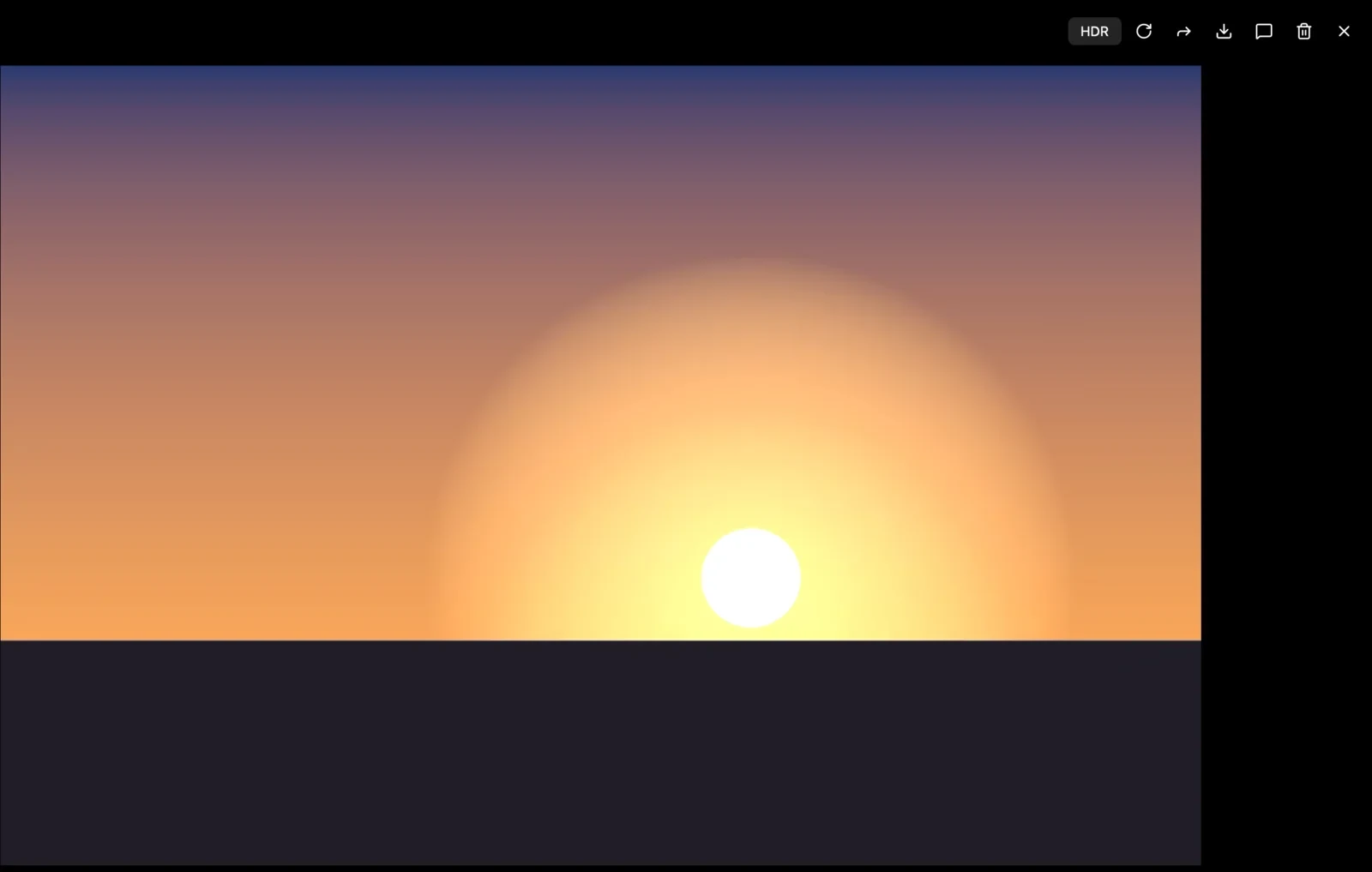
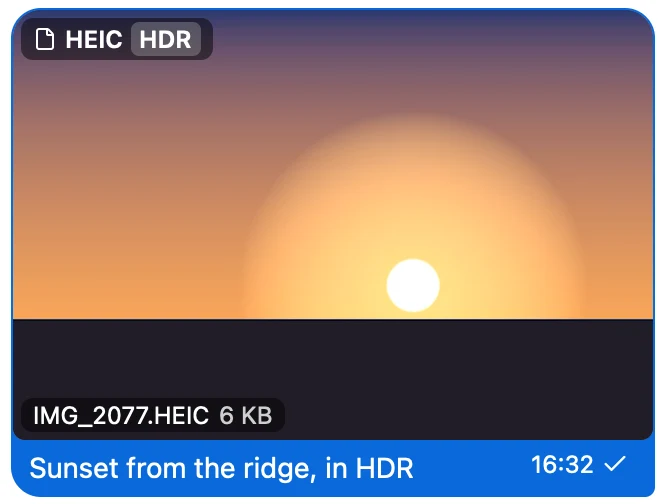
Both apps ran on the same Mac, signed in to the same Telegram account, each with its own local cache.
| Measurement | Quill compared with Telegram Desktop |
|---|---|
| Memory a minute after launch | About a third as much |
| Memory after opening five chats | About 40% as much |
| Window on screen, warm launch | About 4× faster |
| Window on screen, cold launch | About 2× faster |
Apple M1 Pro, 16 GB, macOS 27.0.1. Memory is the physical footprint from footprint, which includes GPU memory, compared as the median of three runs per app, measured on 8 October 2026 against Telegram Desktop 7.2.9. Launch is the time until the window is on screen, measured on 18 October 2026 against Telegram Desktop 7.3.1; a cold launch empties the file cache first. We haven't measured Windows or Linux yet.
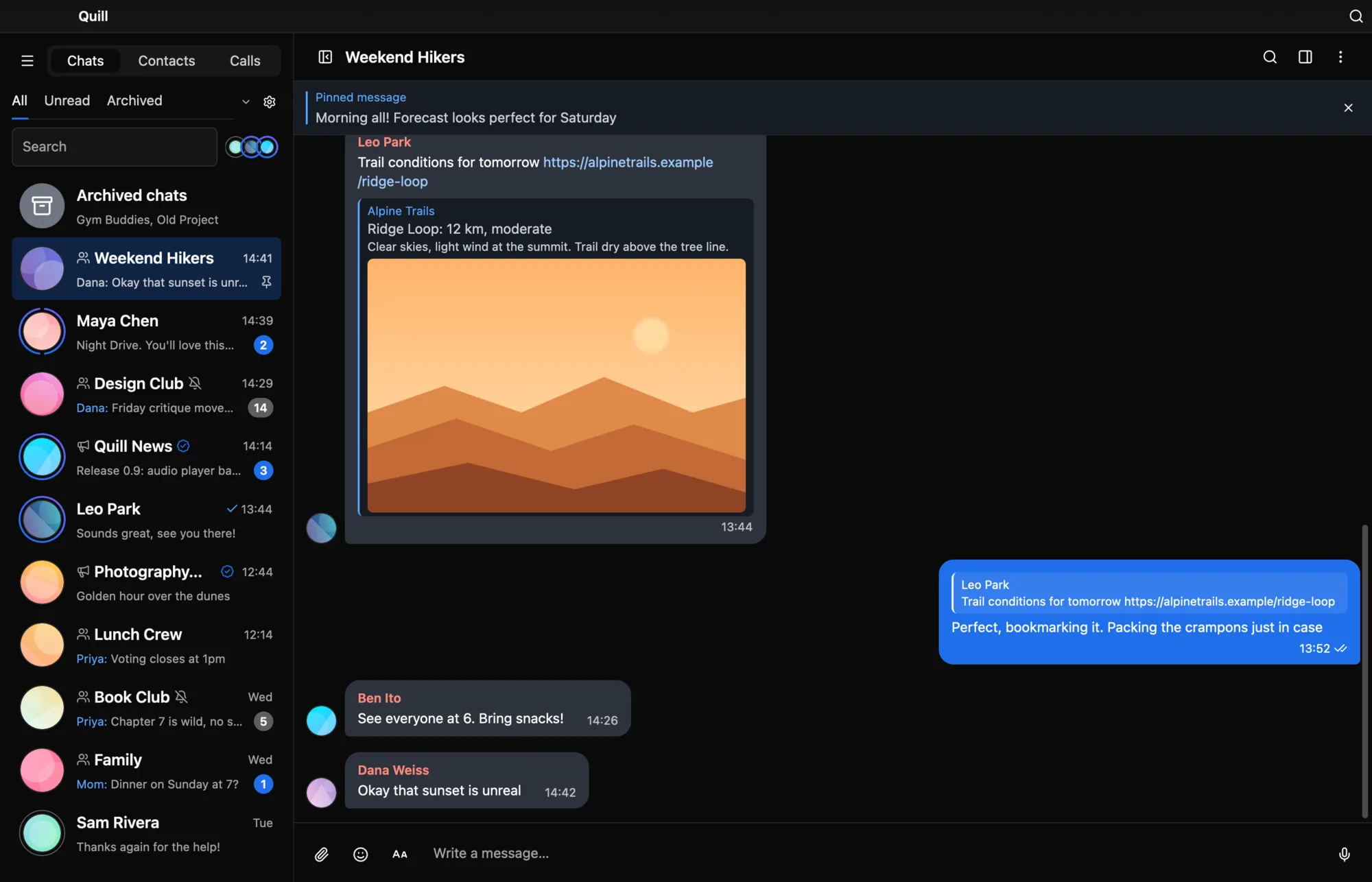
Screenshots of the real app window, signed in to a demo account.
Agent access lets an AI agent on your computer, such as Claude Code, Codex, Claude Desktop or Cursor, read and send your Telegram messages through the Quill you already have open. It's off until you turn it on in Settings → Advanced → Agent access. That page shows the MCP setup lines with Quill's real path, and a setup prompt you can paste into any agent so it connects itself.
--scope user makes Quill available in every project.
claude mcp add --scope user quill -- /Applications/Quill.app/Contents/MacOS/quill mcp
Adds Quill to ~/.codex/config.toml, for the Codex CLI and IDE extension.
codex mcp add quill -- /Applications/Quill.app/Contents/MacOS/quill mcp
Adds Quill to the app's MCP config, after a backup. Use cursor in place of claude-desktop for Cursor.
/Applications/Quill.app/Contents/MacOS/quill agent connect claude-desktop --yes
The same tools work from a terminal without MCP. Other MCP apps take /Applications/Quill.app/Contents/MacOS/quill mcp as a stdio server.
/Applications/Quill.app/Contents/MacOS/quill agent status
These lines assume Quill is in /Applications, where the installer puts it. If you can't write there, the installer uses ~/Applications instead, so start the path with ~ in that case. /Applications/Quill.app/Contents/MacOS/quill agent install-skill adds the Quill skill to Claude Code.
--scope user makes Quill available in every project.
claude mcp add --scope user quill -- "$env:LOCALAPPDATA\Programs\Quill\quill.exe" mcp
Adds Quill to ~/.codex/config.toml, for the Codex CLI and IDE extension.
codex mcp add quill -- "$env:LOCALAPPDATA\Programs\Quill\quill.exe" mcp
Adds Quill to the app's MCP config, after a backup. Use cursor in place of claude-desktop for Cursor.
& "$env:LOCALAPPDATA\Programs\Quill\quill-cli.exe" agent connect claude-desktop --yes
The same tools work from a terminal without MCP. Other MCP apps take the full path to quill.exe with the argument mcp as a stdio server.
& "$env:LOCALAPPDATA\Programs\Quill\quill-cli.exe" agent status
These lines assume Quill is in %LOCALAPPDATA%\Programs\Quill, where the installer puts it. Run commands with quill-cli.exe, which waits for the answer and passes the exit code on. quill.exe is a windowed program, so a terminal doesn't wait for it. & "$env:LOCALAPPDATA\Programs\Quill\quill-cli.exe" agent install-skill adds the Quill skill to Claude Code.
--scope user makes Quill available in every project.
claude mcp add --scope user quill -- ~/.local/bin/quill mcp
Adds Quill to ~/.codex/config.toml, for the Codex CLI and IDE extension.
codex mcp add quill -- ~/.local/bin/quill mcp
Adds Quill to the app's MCP config, after a backup. Use cursor in place of claude-desktop for Cursor.
~/.local/bin/quill agent connect claude-desktop --yes
The same tools work from a terminal without MCP. Other MCP apps take ~/.local/bin/quill mcp as a stdio server.
~/.local/bin/quill agent status
These lines assume the installer's ~/.local/bin/quill. If you run Quill from an unpacked tarball, use the quill in that folder. Claude Desktop has no official Linux build. For unofficial builds, connect claude-desktop writes ~/.config/Claude/claude_desktop_config.json. ~/.local/bin/quill agent install-skill adds the Quill skill to Claude Code.
By default agents see Saved Messages, your bots and the channels you own. Anything else needs your grant, and Quill asks you when an agent wants more. A second switch lets an agent click and type in Quill's window, under the same grants.
Messages go out in your name and appear in an activity log in Quill. You can make each one wait for your click. Quill paces sends to stay inside Telegram's limits.
Quill never sends your data to an AI service itself, and it opens no network port. Agents reach it through a local socket with a token that changes every launch. Read receipts, online status and typing are never hidden, and there's no bulk export. Telegram's terms don't allow training AI models on your chats.
The agent guide lists every tool, with recipes and errors. quill agent --help lists every command and exit code.
Quill doesn't reimplement Telegram's protocol. Every request goes through TDLib, Telegram's own client library, which handles encryption, sync and the local message database.
The interface is Rust on GPUI, the GPU-drawn UI framework from the Zed editor. The main window has no browser engine or web view. Bot mini apps open in a separate web view helper.
The source is on GitHub under the MIT license. The repository lists every third-party component and its license, and so does the app, under Settings → Appearance → About Quill.
There's no release yet. The first builds will show up here, and on GitHub Releases, when they're ready. Until then you can build Quill from source.
Quill installs in Applications and opens straight away. Run the same command later to update.
curl -fsSL https://raw.githubusercontent.com/shinycake/quill/main/scripts/macos-install.sh | bash
Quill for Mac is signed with a Developer ID and notarized by Apple, so macOS opens it without a warning however you install it.
Open the downloaded file and drag Quill onto the Applications folder in the window that appears. Then open Quill from Launchpad or Spotlight.
Download for macOSPrefer a zip? Download the zip, double-click it and drag Quill into Applications.
Quill has its own Homebrew tap, and it keeps updating itself after Homebrew installs it.
brew install --cask shinycake/tap/quill-app
Get the app as a zip file. Double-click it, drag Quill into your Applications folder and open it.
Download for macOS (zip)Installed Quill on a Mac before 3 November 2026? That copy was signed the old way and can't update to the notarized version by itself. Install it once with the Terminal command or the zip above. Your accounts and settings stay, and updates work as usual after that.
Quill installs for your account and starts straight away, without the “Windows protected your PC” warning. Run the same command later to update.
irm https://raw.githubusercontent.com/shinycake/quill/main/scripts/windows-install.ps1 | iex
%LOCALAPPDATA%\Programs\Quill and adds it to the Start menu. You can remove it in Settings → Apps.Why there's no warning: Windows SmartScreen checks programs that a browser downloads. Quill isn't signed with a paid code-signing certificate yet, so the zip below asks you to confirm it once. PowerShell doesn't mark its downloads for that check. Smart App Control on Windows 11 checks every app, so if you turned it on, it may still block Quill.
Run the downloaded file. It installs Quill for your account, with no administrator rights, adds it to the Start menu and to Settings → Apps. Windows asks you to confirm it once, as shown below for the zip: click More info, then Run anyway.
Download the Windows installerGet Quill as a zip file. The first time you start it, Windows asks you to confirm it.
Download for Windows (zip)Unzip it. Right-click the zip, choose Extract All, then open quill.exe in the new folder. Keep the files in that folder together.
Windows says it protected your PC. Click More info. Don't click Don't run.
Click Run anyway. The dialog now names the app. Click Run anyway. Quill starts, and from then on it starts like any other app.
No Visual C++ Redistributable or anything else is needed. Quill writes nothing outside your user profile.
Quill installs for your account, shows up in your applications menu and opens straight away. Run the same command later to update.
curl -fsSL https://raw.githubusercontent.com/shinycake/quill/main/scripts/linux-web-install.sh | bash
~/.local/opt/quill, with ~/.local/bin/quill and a menu entry. ~/.local/opt/quill/install.sh --uninstall removes it.Quill has its own Flatpak repository, so it updates along with your other Flatpak apps. Open the file below with your software center, or run:
flatpak install --user https://shinycake.github.io/quill/flatpak/quill.flatpakref
Signed with Quill's own key. Flatpak installs the GNOME runtime Quill needs along with it.
Get Quill as a tarball. It runs from any folder, or installs under ~/.local.
tar -xzf quill-linux-*-bundle.tar.gzquill-linux-*/install.sh to add Quill to your applications menu, or start quill-linux-*/quill where it is.Quill needs a glibc-based distribution on x86_64 or arm64, a Vulkan driver and GTK 3. Mainstream desktops have them. On a minimal Debian or Ubuntu system, install them with sudo apt install libgtk-3-0 libxkbcommon-x11-0 libvulkan1 mesa-vulkan-drivers libfontconfig1 libasound2. Bot mini apps also need WebKitGTK 4.1, and Quill tells you what to install the first time you open one.
macOS 14 or later on Apple Silicon · Windows 10 or later (x64) · Linux x86_64 or arm64 with glibc. The macOS build is notarized by Apple. The Windows build isn't signed with a paid certificate yet, so a zip from the browser asks you to confirm the first launch. The one-line installer doesn't.
No. Quill is an independent project. It isn't affiliated with, endorsed by, or sponsored by Telegram. It uses the public Telegram API under Telegram's API Terms of Service, through Telegram's own TDLib library.
It's a separate app, written from scratch in Rust. GPUI, the framework from the Zed editor, draws its interface on the GPU. On our test Mac it used about a third of Telegram Desktop's memory and put its window on screen about four times faster on a warm launch. Windows and Linux haven't been measured yet. How we measured.
Quill follows Telegram's rules for third-party apps, but Telegram decides what it allows, and we can't promise anything. Quill is experimental software. Use it at your own risk and keep an official Telegram app installed.
No. Quill runs on your computer and keeps its data there, encrypted with a key held in the macOS keychain, sealed with Windows DPAPI, or in a file only your user can read on Linux. Quill has no server and the app collects no analytics. Besides Telegram, it only contacts GitHub to check for updates, and you can turn that off. This website counts visits with GoatCounter, which sets no cookies and records no personal data.
Yes. Quill is free software under the MIT license. There's nothing to buy and no account other than your Telegram one.
The Windows build isn't signed with a paid Microsoft certificate yet, and Windows checks programs that a browser downloads. The one-line installer downloads with PowerShell, so there's nothing to confirm. If you downloaded the zip, confirm it once with More info → Run anyway. macOS doesn't ask, because the Mac build is signed with a Developer ID and notarized by Apple. Linux doesn't ask either. Each release lists SHA-256 checksums so you can verify the download.
Quill is made and tested day to day on a Mac. The Windows and Linux builds pass the same automated tests on every release, but they've had little use on real computers so far, so expect rough edges there. If something breaks, please open an issue.
Try it, and open an issue when something breaks or feels off. Pull requests are welcome too. A star on GitHub also helps: it's how lists like Homebrew's decide what to include.